The short answer: send a PDF unless the job advert or recruiter asks for Word. A PDF looks the same on every phone and computer, cannot be changed by accident, and opens without Word installed. There are good reasons to send Word in some cases, and one detail about how you make the PDF matters more than most people realise.
Why PDF is usually the better choice
- Layout stays fixed. A Word file can reflow on another computer if fonts are missing or the Word version differs. Bullet points move, a heading lands alone at the bottom of a page, and two pages become three.
- It looks finished. Recruiters often read CVs on their phones, where PDFs display reliably.
- No accidental edits and no tracked changes or comments left behind from an earlier draft.
When to send Word instead
- The advert asks for it. Always follow the instructions.
- Recruitment agencies often reformat CVs into their own template before sending them to clients, which is far easier from a Word file.
- Older application systems occasionally parse DOCX more reliably than PDF. If a portal offers to fill in your profile from the CV and gets it badly wrong with a PDF, try the Word file.
Make sure software can read your PDF
Many employers run CVs through an applicant tracking system that reads the text to fill in your profile and match keywords. That only works if the PDF contains real text. Exporting from Word (File, then Save As or Export, then PDF) or from Google Docs (File, then Download, then PDF) produces exactly that.
Some converters, including Word to PDF on this site, draw each page as an image so the layout is guaranteed to match the original. That is ideal for printing and for documents where looks matter most, but software cannot read text from an image. For job applications, export your CV directly from Word or Google Docs. You can check any PDF by trying to select a sentence, or by running it through PDF to Text to see exactly what a machine would read.
Finishing touches that recruiters notice
- File name: Firstname-Lastname-CV.pdf, not CV.pdf or Resume-new-final.pdf.
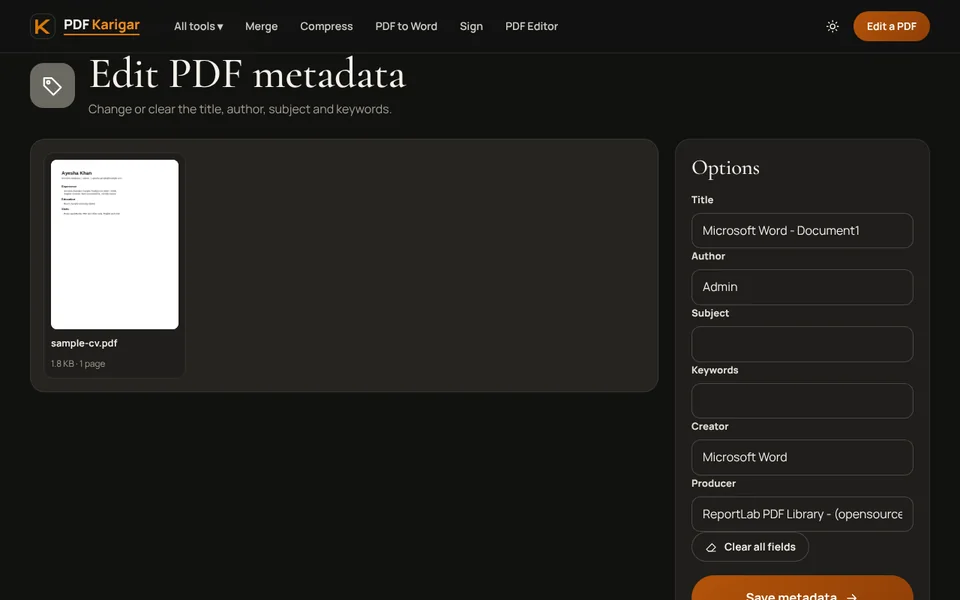
- Document title: PDFs carry a hidden title and author, often left over from a template, such as “Microsoft Word - Document1” or another person’s name. Set them to your name with Edit metadata.
- Page numbers: on a two- or three-page CV, add them with Add page numbers so printed pages stay in order.
- Size: a text CV is small. If yours is over 1 MB, a large photo is the usual reason; Compress PDF fixes it without touching the text.
One file or several?
If a portal has one upload box for “CV and supporting documents”, put your CV first and then the certificates in the order requested, using Merge PDF. If there are separate boxes, upload separate files. When emailing, attach the CV and cover letter separately so each can be forwarded on its own.
Regional habits
CV conventions differ. In the Gulf, many employers still expect a photo, nationality and current visa status on the CV. In the UK and US these are usually left out, and a photo can even work against you. Whatever the region, two pages is a sensible length for most people, and every line should help the reader decide to call you.
Frequently asked questions
Can applicant tracking systems read a PDF CV?
Yes, if the PDF contains real text, which is what Word and Google Docs produce when you export to PDF. A scanned CV or one saved as page images cannot be read by these systems, so it may be filed with an empty profile.
Should my CV include a photo?
It depends on where you apply. Many employers in the Gulf and parts of South Asia still expect a photo, while in the UK and US photos are usually left out. Follow the job advert or the local norm.
What file name should I use?
Use your name and the document type, for example Firstname-Lastname-CV.pdf. Avoid names like CV-final-2.pdf, which get lost among hundreds of similar downloads.