Printing a document, signing it with a pen and scanning it back is slow, needs equipment and leaves you with a blurry, crooked copy. Sign PDF places your signature directly on the digital file, so the rest of the document stays sharp and the whole job takes a minute.
Three ways to create your signature
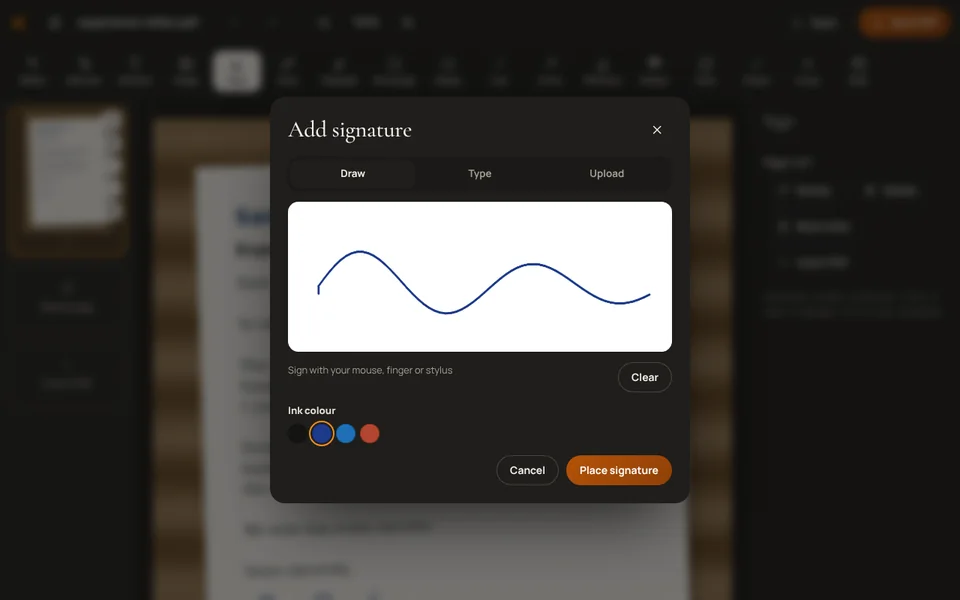
- Draw it with your finger on a phone or tablet, or with a mouse or trackpad on a computer. Draw it larger than you need; it will look smoother when scaled down.
- Type it. Type your name and pick a handwriting style. Quick and neat, and fine for many informal documents.
- Upload a photo of it. Sign a plain white sheet with a dark pen, photograph it in daylight and upload the picture. This gives the most natural result and you can reuse the photo.
How to sign
- Open Sign PDF and choose the file.
- Create your signature using one of the three methods.
- Place it on the signature line and drag the corners to resize it so it fits the space.
- Add the date or your initials where the document asks for them.
- Download the signed PDF and open it once to check that everything is in place.
Documents with form fields
Some PDFs have boxes you can type into. Fill those first with Fill PDF form, save, and then add your signature. If a document needs text changed or added where there is no form box, such as a date or reference number, use the PDF Editor, which can also sign.
Initials on every page
Contracts and tenancy agreements often ask for initials at the bottom of each page. Create your initials once, then place a copy on each page. It is worth zooming out to check that every page has them before you download.
Mistakes to avoid
- Covering text. A signature that is too large can hide the printed name or date beside the line. Resize it to fit the space.
- Signing a draft. Make sure you have the final version of the document before signing, so you do not have to sign twice.
- Missing pages. Long agreements often need a signature on more than one page. Search the document for “signature” or “sign here” before downloading.
- Forgetting the date. Many forms are invalid without one. Add it next to the signature.
Is it legally valid?
What this produces is an electronic signature: an image of your signature placed on the page. Employers, landlords, schools and many businesses accept it for everyday documents. It is not a certified digital signature, which uses a certificate to prove who signed and that nothing changed afterwards. Some government and legal processes require that kind, often through a national service such as UAE PASS in the UAE or Aadhaar-based eSign in India. When in doubt, ask whoever needs the signed document. This is general information, not legal advice.
Keep the signed file safe
- Send it only to the people who need it; any image can be copied from a PDF.
- Add a password with Protect PDF before emailing it, and share the password separately.
- Keep the unsigned original too, in case corrections are needed later.
Your signature and document are processed in your browser and never uploaded to a server.
Frequently asked questions
Is a signature added this way legally valid?
For many everyday documents, such as offer letters, tenancy forms and consent forms, a signature placed on the PDF is widely accepted. Some legal and government processes require a certified digital signature instead. If you are unsure, ask the organisation that requested the signature. This is general information, not legal advice.
Can someone copy my signature from the PDF?
Anyone who has the file can copy an image from it, just as they could photocopy a paper signature. Share signed documents only with the people who need them, and add a password with Protect PDF when sending by email.
Can I sign on my phone?
Yes. Open Sign PDF in your phone’s browser and draw your signature with a finger. It is often easier to draw on a phone than with a mouse.